
Views: 222 Author: Mega Services Publish Time: 2026-08-28 Origin: Site


Content Menu
● What Do Thermostat Fan Settings Mean?
● AUTO vs. ON: Quick Comparison
● Why AUTO Is Usually Best During Air-Conditioning Season
● When the ON Fan Setting May Be Helpful
>> Uneven Temperatures Between Rooms
>> More Frequent Air Filtration
● How Continuous Fan Operation Affects Your Air Filter
● How to Choose the Best Fan Setting for Your Home
>> Choose AUTO If You Want Better Summer Humidity Control
>> Consider ON If You Need More Air Movement
>> Consider CIRCULATE for a Balanced Approach
● Common Fan-Setting Mistakes to Avoid
>> Do Not Use ON to Hide a Serious Comfort Problem
>> Do Not Ignore High Indoor Humidity
>> Do Not Upgrade Filters Without Checking System Compatibility
● A Better Way to Evaluate Home Comfort
● Summary
>> 1. Is it better to set my thermostat fan to AUTO or ON?
>> 2. Does leaving the AC fan ON increase indoor humidity?
>> 3. Does running the fan continuously improve indoor air quality?
>> 4. How often should I change my HVAC filter if the fan is always ON?
>> 5. Is CIRCULATE better than leaving the fan ON?
>> 6. Can the fan setting fix a hot upstairs or cold bedroom?
>> 7. What indoor humidity level should I aim for?
For most homes, the AUTO thermostat fan setting is the better everyday choice. It can reduce unnecessary electricity use, support more effective humidity control during cooling season, and limit blower runtime.
However, the ON or CIRCULATE setting may be useful for certain homes—particularly those with uneven temperatures, allergy concerns, pets, or rooms that feel stuffy. The best setting depends on your HVAC equipment, local climate, indoor humidity, ductwork, filter type, and household comfort needs.
At Mega Services Heating & Cooling, we help homeowners understand how small thermostat adjustments can influence comfort, air quality, system performance, and long-term operating costs. Your fan setting is not just a preference; it is part of how your heating and cooling system manages the air throughout your home.
Most thermostats provide at least two fan settings: AUTO and ON. Many modern smart thermostats also offer a third setting, often called CIRCULATE, INTERMITTENT, or FAN SCHEDULE.
Each option changes when the indoor blower operates.
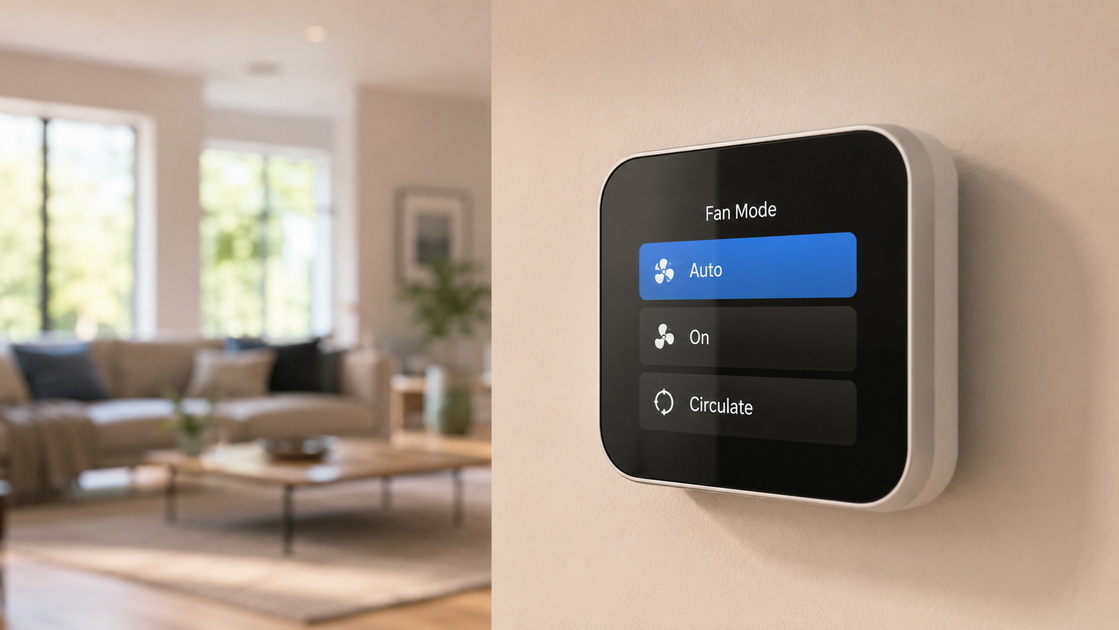
When your thermostat fan is set to AUTO, the blower operates only when the heating or cooling system is actively running.
For example, during summer, the air conditioner starts a cooling cycle when indoor temperatures rise above the thermostat setting. The blower moves warm household air across the indoor evaporator coil, then distributes cooled air through the ductwork. Once the desired temperature is reached, the air conditioner stops and the blower shuts off after a short delay.
The AUTO setting is usually a practical choice because it provides comfort without keeping the blower running continuously.
When the fan is set to ON, the indoor blower continues running even after the furnace, heat pump, or air conditioner finishes its heating or cooling cycle.
The thermostat still controls when the system heats or cools. The difference is that the blower keeps circulating air between those cycles.
This can improve air movement in some homes, but it can also increase electricity use, shorten filter life, and create humidity concerns during hot weather.
The CIRCULATE setting provides a middle option between AUTO and ON.
Rather than running continuously, the thermostat turns on the blower for a limited number of minutes each hour. The exact schedule varies by thermostat model and homeowner settings.
CIRCULATE can help move air through the house more often without requiring full-time fan operation. It is often useful when a homeowner wants better air mixing but does not need the fan to run all day.
| Feature | AUTO | ON | CIRCULATE |
|---|---|---|---|
| Fan operation | Runs only during heating or cooling cycles | Runs continuously | Runs periodically between cycles |
| Electricity use | Usually lower | Usually higher | Usually moderate |
| Summer humidity control | Usually better | May be less effective | Depends on runtime and climate |
| Air circulation | Cycle-based | Continuous | Intermittent |
| Air filtration | During active HVAC cycles | More frequent filter passes | More frequent than AUTO |
| Filter replacement needs | Standard inspection schedule | Often requires more frequent checks | May require more frequent checks |
| Blower runtime | Lower | Highest | Moderate |
| Best fit | Most homes | Selected comfort or air-quality needs | Homes needing a balanced approach |
The AUTO setting is generally the preferred choice for homeowners using central air conditioning, especially in areas with warm or humid summers.
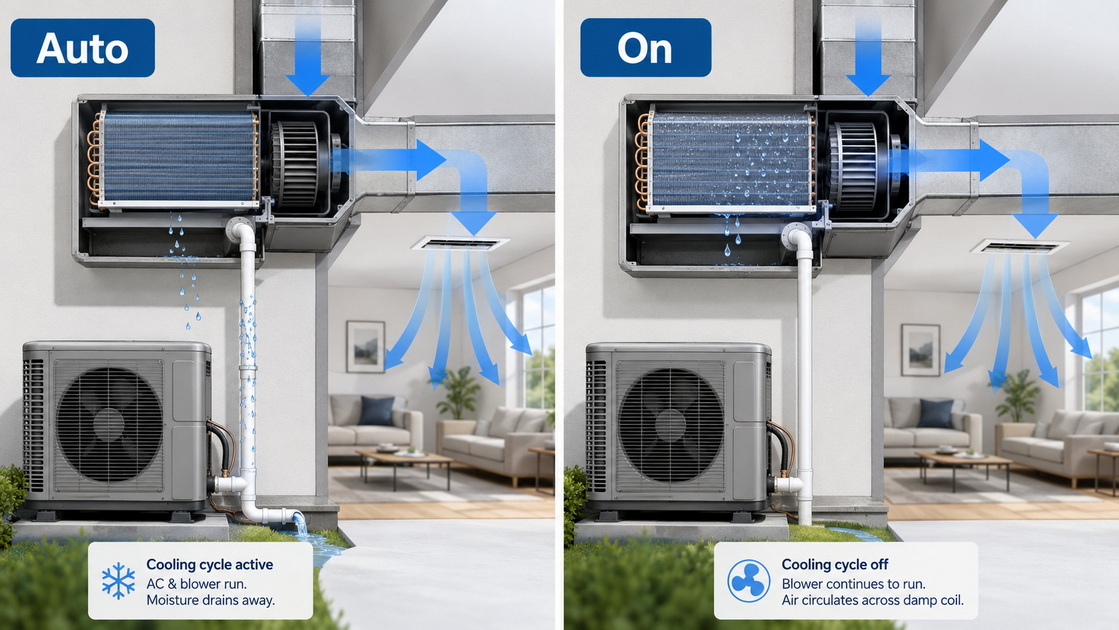
Your air conditioner does more than cool the air. It also removes moisture.
As warm indoor air passes across the cold evaporator coil, water vapor in the air condenses on the coil. The condensed water drains into the system's condensate pan and exits through the drain line.
This moisture-removal process helps the home feel more comfortable. A house can reach the desired thermostat temperature but still feel sticky if indoor humidity remains high.
When the thermostat fan is set to AUTO, the blower stops after the cooling cycle ends. This gives moisture remaining on the evaporator coil time to drain away.
When the fan is set to ON, the blower continues pushing air over the damp coil even after cooling stops. In humid weather, some moisture may evaporate back into the air and return to the living space. The result can be a home that feels cool but damp.
A healthy indoor humidity range is generally between 30% and 50%. Humidity levels above this range can make the home feel uncomfortable and may create conditions that support mold growth, mildew, and dust mites.
Every time the blower runs, it uses electricity.
With AUTO selected, the fan operates only when your HVAC system is heating or cooling. With ON selected, it may run day and night—even when the home is already at the chosen temperature.
The exact cost difference depends on several factors:
- Type of blower motor
- Electricity rates
- Fan speed
- System age
- Climate conditions
- Daily heating and cooling demand
- Number of hours the fan runs
Older HVAC systems with single-speed blower motors may use noticeably more electricity when the fan runs continuously. Newer variable-speed systems can often circulate air at lower speeds and lower energy use, but continuous operation can still increase total energy consumption.
Continuous fan operation increases total runtime for the blower motor and related components.
A properly maintained HVAC system can operate safely with the fan set to ON. However, more runtime means more hours of use for the motor, capacitor, electrical connections, bearings, and air filter.
AUTO can help reduce unnecessary runtime while still allowing your heating and cooling system to operate normally.
[Suggested image placement: An educational diagram showing how warm, humid household air moves across an evaporator coil, releases moisture, and returns to the home as cooler, drier air.]
The ON setting is not always a poor choice. In the right situation, continuous airflow can improve comfort and help address specific household needs.
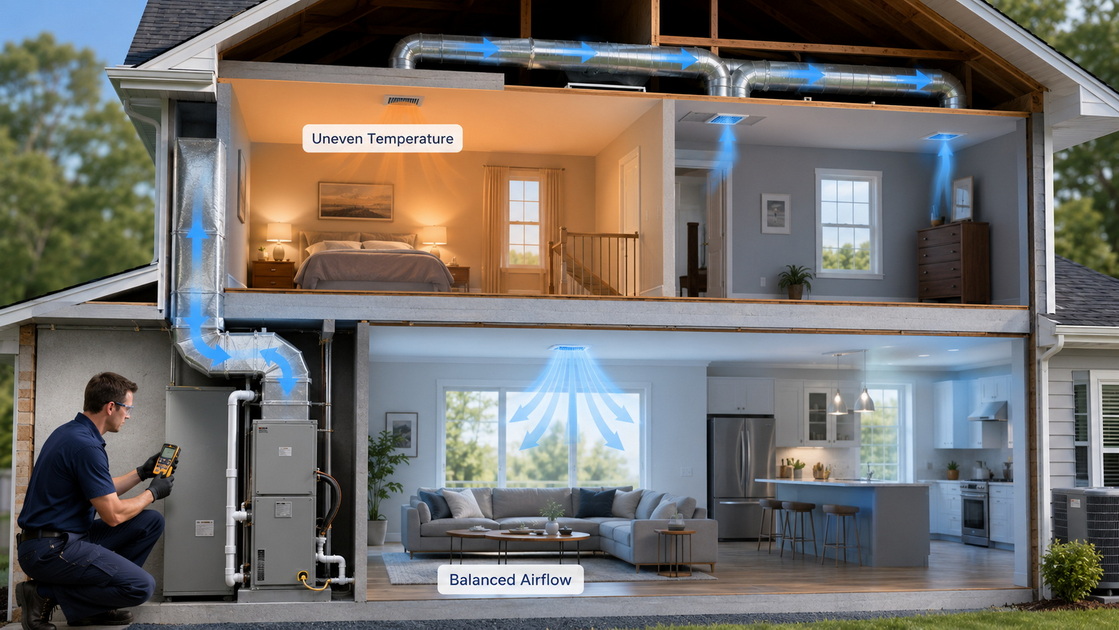
One of the most common comfort complaints is uneven temperatures.
A homeowner may find that:
- The upstairs is warmer than the downstairs.
- One bedroom is too cold in winter.
- A back room feels stuffy.
- A sun-facing room becomes hot every afternoon.
- The room closest to the thermostat feels comfortable, while other rooms do not.
Leaving the fan ON can help mix the air between rooms and reduce mild temperature differences. The blower continues moving air through the ductwork, even after the system has finished an active heating or cooling cycle.
This may help distribute conditioned air more evenly throughout the home.
However, continuous fan operation is not a complete solution for significant hot or cold spots. Persistent temperature imbalance may indicate a larger issue, such as:
- Leaking or undersized ductwork
- Inadequate return-air pathways
- Closed or blocked supply vents
- Incorrectly adjusted dampers
- Poor attic insulation
- Air leaks around windows and doors
- An improperly sized heating or cooling system
- A thermostat located in an unrepresentative area of the home
If a room is consistently uncomfortable, it is important to identify the underlying cause rather than relying only on the fan setting.
When the HVAC fan runs, indoor air moves through the system filter.
With the fan set to ON, more air passes through the filter during the day. This can be helpful for households dealing with:
- Pet hair and pet dander
- Dust accumulation
- Seasonal pollen
- Mild allergy concerns
- Frequent indoor activity
- Multiple occupants
- Homes near busy roads or construction areas
More airflow through the filter can improve particle capture, but the result depends heavily on filter quality, fit, and maintenance.
A filter that is poorly fitted, heavily loaded with dust, or too restrictive for the equipment can reduce airflow and create new problems. The best filter is not necessarily the highest-rated filter available. It should match your HVAC system's airflow requirements and your household's air-quality needs.
In a dry climate, the humidity concerns associated with continuous fan operation may be less noticeable.
Some homeowners may prefer ON or CIRCULATE because the added air movement can make rooms feel fresher and reduce mild temperature differences. This can be especially helpful in large homes, multi-story homes, or homes with long duct runs.
Even in dry conditions, it is still wise to evaluate whether the benefit is worth the added fan runtime and more frequent filter maintenance.
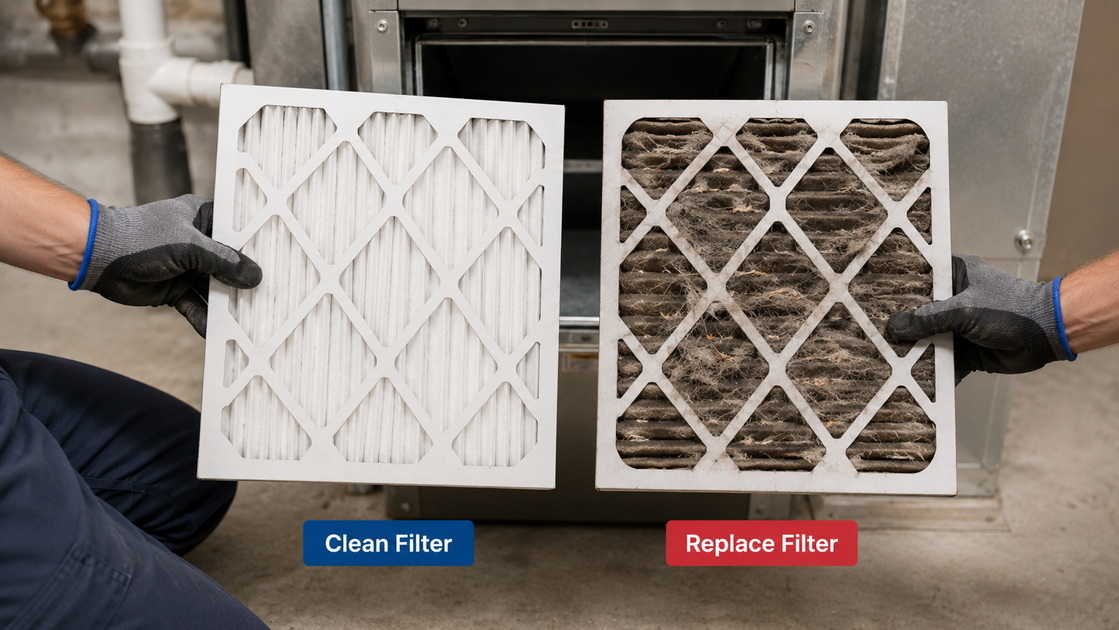
Your HVAC filter protects the equipment by capturing airborne dust and debris before it reaches sensitive internal components.
When the fan is set to AUTO, the filter processes air during heating and cooling cycles.
When the fan is set to ON, it processes air almost continuously. That means the filter can become dirty more quickly.
A loaded filter can restrict airflow and contribute to several performance issues:
- Reduced heating and cooling output
- Higher energy use
- Increased strain on the blower motor
- Uneven temperatures
- Noisy airflow
- Frozen evaporator coils during cooling season
- Reduced comfort in distant rooms
If you use ON or CIRCULATE regularly, inspect your filter every month.
Replace it when it looks visibly dirty, loaded with pet hair, or coated with dust. Homes with pets, smokers, construction dust, frequent cooking, or allergy concerns may need more frequent replacement.
When replacing a filter:
1. Confirm the correct filter size.
2. Check the airflow arrow on the filter frame.
3. Install the filter with the arrow pointing toward the furnace or air handler.
4. Use a filter rating that your system can support.
5. Avoid forcing an oversized or overly restrictive filter into the slot.
6. Keep a reminder on your calendar or thermostat app.
A clean, correctly installed filter supports airflow, comfort, equipment protection, and more consistent heating and cooling.
The right thermostat fan setting depends on the problem you are trying to solve.
AUTO is often the best choice if:
- You live in a humid climate.
- Your home feels cool but sticky in summer.
- You want to minimize fan-related electricity use.
- Your rooms already heat and cool evenly.
- You have an older single-speed blower motor.
- Your air filter gets dirty quickly.
- You want the system to run only when heating or cooling is needed.
For most standard central air-conditioning systems, AUTO is the most reliable default setting.
ON may be useful if:
- Your home has mild hot and cold spots.
- Rooms feel stale or stuffy between HVAC cycles.
- You want more air passing through the filter.
- You have pets or high dust levels.
- Your climate is generally dry.
- Your HVAC system is designed for continuous circulation.
- You are willing to check filters more frequently.
If ON improves comfort but also makes the home feel humid, switch back to AUTO and evaluate the system's cooling and dehumidification performance.
CIRCULATE may be a good fit if:
- You want more air mixing than AUTO provides.
- You do not want the fan running all day.
- You have minor room-to-room temperature differences.
- Your thermostat allows you to set fan minutes per hour.
- You want more regular filtration without full-time blower operation.
Many homeowners find that CIRCULATE offers a practical middle ground, particularly in spring and fall when the HVAC system runs less frequently.
A thermostat fan setting can support comfort, but it cannot correct every HVAC issue.
If one room is always too hot or too cold, the issue may be related to airflow, ductwork, insulation, return-air design, or equipment sizing.
Continuous fan operation may reduce the discomfort temporarily, but the underlying problem can remain.
If the home feels damp, musty, or sticky while the air conditioner is running, check indoor humidity with a simple hygrometer.
Humidity that remains consistently high can signal issues such as:
- An oversized air conditioner that cools too quickly
- Short cooling cycles
- A dirty evaporator coil
- Refrigerant problems
- Poor condensate drainage
- Duct leakage
- Outdoor air entering through gaps in the home
- A fan setting that is not suitable for local humidity conditions
A higher-efficiency filter can capture smaller particles, but it can also create more airflow resistance.
Before moving to a higher MERV filter, confirm that the equipment, ductwork, and filter cabinet can handle it. This is especially important for older systems, systems with limited return-air capacity, or homes that already have weak airflow.
Before making a permanent change to your thermostat fan setting, track how your home responds for several days.
Pay attention to:
- Thermostat temperature
- Indoor humidity level
- Rooms that feel too warm or too cool
- Airflow from supply vents
- How quickly the filter becomes dirty
- Whether the home feels stuffy between cycles
- Changes in electricity use
- Whether the air conditioner runs long enough to remove moisture
This information can reveal whether AUTO, ON, or CIRCULATE is helping—or whether a larger comfort issue needs attention.
For example, if the upstairs stays warm only when the fan is in ON mode, the home may benefit from duct balancing, added return air, insulation improvements, zoning, or a system performance inspection.
For most homes, AUTO is the best thermostat fan setting. It allows the blower to run only when the system is heating or cooling, which can reduce electricity use, minimize blower runtime, and support better humidity control during air-conditioning season.
The ON setting can be helpful for selected homes that need more continuous airflow, improved air mixing, or more frequent filtration. However, it can increase energy use, require more frequent filter replacement, and make indoor humidity harder to manage in warm, humid weather.
The CIRCULATE setting can offer a useful balance by providing regular airflow without keeping the fan running around the clock.
If your home has uneven temperatures, high humidity, poor airflow, persistent dust, or rooms that never feel comfortable, the fan setting may be only part of the answer. A thorough review of the HVAC system, ductwork, filters, insulation, and indoor-air conditions can provide a clearer path to long-term comfort.
Mega Services Heating & Cooling helps homeowners create safer, more comfortable, and more energy-efficient living environments through professional air-conditioning, heating, maintenance, airflow, and indoor-air-quality services. A properly maintained system and the right thermostat settings can make a meaningful difference in everyday comfort.
For most homes, AUTO is the better choice. It runs the blower only when the system is heating or cooling, which usually reduces electricity use and supports better humidity control during summer. ON may be helpful for air circulation or mild temperature imbalance, but it can increase operating costs.
It can increase humidity in some homes. When an air-conditioning cycle ends, moisture remains on the evaporator coil. If the blower continues running, some of that moisture may evaporate back into the home. AUTO allows more time for moisture to drain away.
Continuous fan operation sends more household air through the HVAC filter. This can help capture dust, pollen, pet dander, and other airborne particles. However, the result depends on using a properly fitted, clean filter with a rating suitable for the HVAC system.
Inspect the filter monthly. A continuously running fan moves much more air through the filter, so it can become dirty faster. Replace it when it appears loaded with dust, debris, or pet hair, and follow the system manufacturer's maintenance recommendations.
For many homes, CIRCULATE is a better alternative to ON. It provides additional air mixing and filtration without requiring the blower to run all day. It can be especially useful for homes with mild temperature differences between rooms.
It may help reduce minor temperature differences by mixing air more frequently. However, ongoing hot or cold spots often point to ductwork problems, inadequate return air, insulation gaps, blocked vents, thermostat placement issues, or system sizing concerns.
A comfortable and healthy target for most homes is generally between 30% and 50% relative humidity. Levels that remain above 50% may make the home feel sticky and can contribute to mold, mildew, and dust-mite concerns.
1. One Hour Heating & Air Conditioning.
2. U.S. Environmental Protection Agency.
3. U.S. Environmental Protection Agency.
4. ENERGY STAR.
5. ARS/Rescue Rooter.
6. Meyer & Depew.


